Extracted Tags

Enter a YouTube video URL above to see its tags
What Does This Tool Do?
Paste in a video's URL and this tool reads back the exact tags attached to it — nothing guessed from the title, nothing inferred from the description. If the uploader typed twelve tags into the upload form, you'll see all twelve, in the order they entered them.
It's built for anyone doing competitor research or trying to understand why a particular video shows up where it does: creators checking a niche before their first upload, marketers scoping out a launch, or anyone auditing a channel's metadata strategy. Once you have the list, you can copy it wholesale, or — more usefully — treat it as one data point among several videos you check before deciding what to write into your own tag field.
What Is a Tag Extractor?
In general, a tag extractor is any tool that pulls the metadata tags attached to a piece of online content — a photo, a blog post, a product listing, a video — and shows them to you in one place, without needing to dig through the platform's own editing interface.
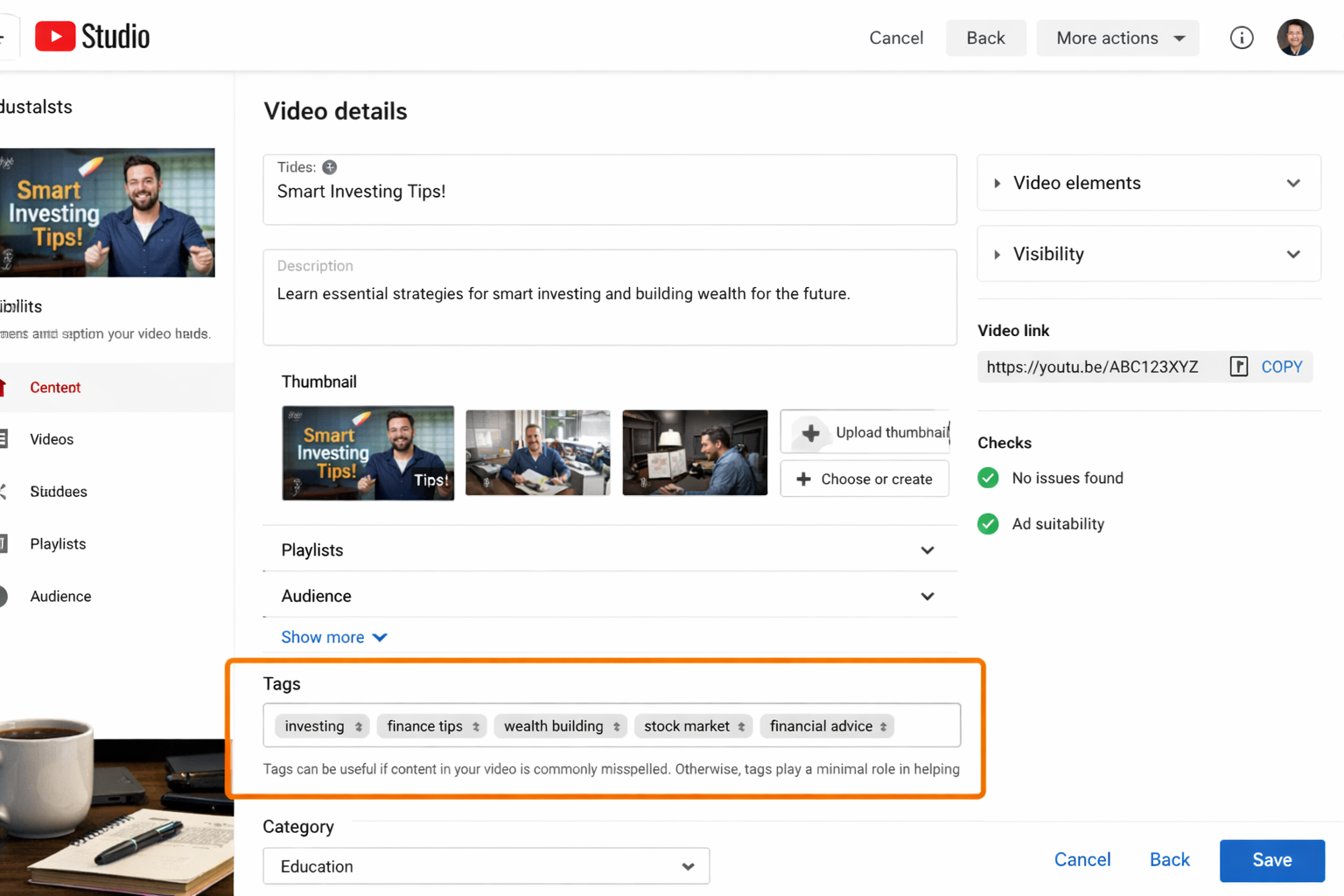
This page is built specifically around YouTube. When someone uploads a video, they fill in a "Tags" field in the advanced upload settings — a field YouTube never displays to viewers. This tool reads that field for any public video and shows you its contents, so you don't need studio access to the channel or any guesswork about what the uploader typed in.
How to Extract Tags From a YouTube Video
Open the video
Find the video or Short you want to check — your own upload or a competitor's.
Copy the URL
Grab the link from your browser's address bar, or use Share in the YouTube app.
Paste it into the tool
Drop the link into the box at the top of this page.
Extract the results
Select Extract Tags. The full list appears within a couple of seconds.
Review or copy the results
Read through the list, or select Copy All Tags to use it elsewhere.
What Are YouTube Video Tags?
Video tags are short keywords or phrases an uploader adds in the advanced settings of YouTube's upload form — separate from the title, description, and any hashtags. Creators use them to give YouTube's systems extra context: what the video is about, which related terms it should be associated with, and how common misspellings of the topic might apply.
What you see in the results above is exactly what the uploader typed — not YouTube's interpretation of the video, and not a ranking score. Treat it as one input in your research, not a verdict. A tag list tells you what a creator was targeting; it doesn't tell you whether that targeting worked.
Tags, Hashtags, and Keywords Aren't the Same Thing
Creators mix these terms up constantly, and it leads to wasted effort. Here's what each one actually does:
| Signal | Where you add it | Visible to viewers? | Rough limit | What it's actually for |
|---|---|---|---|---|
| Video tags | Upload settings → Tags field | No | ~500 characters total | Gives YouTube's system context about the topic and helps with misspellings and related-video matching |
| Hashtags | Typed into the title or description with a # | Yes, and clickable | Up to 15 recognized; first 3 show above the title | Links to a public hashtag results page and drives browse-style discovery |
| Title & description keywords | The title and description text itself | Yes, fully visible | Title ~100 characters, description ~5,000 characters | The strongest text-based ranking signal — what YouTube reads first when matching a search |
Once your tags are sorted, use our YouTube Hashtags Generator to build the visible, clickable side of your metadata too.
How to Use Extracted Tags for Research
A single tag list doesn't tell you much on its own. The value shows up when you extract tags from several videos in your niche and start comparing them:
Look for what repeats
Pull tags from three or four videos ranking well for a topic you care about. Phrases that show up across multiple lists are the ones worth prioritizing — that's real evidence of what other creators are targeting, not a guess.
Group similar terms
Cluster variants together — "beginner python," "python for beginners," "learn python" — and you'll usually spot one core phrase with several ways people search for it. That's your primary tag; the rest are supporting variants.
Spot gaps, not just overlaps
If every top video tags for the broad topic but none mention a specific angle you have in mind, that's a content opportunity — not something a tag list will spell out directly, but something you'll notice by comparing several at once.
Don't copy blindly
A tag that worked for someone else's video only makes sense if it actually describes yours. Use extracted tags as research input to shape your own list — not as a list to paste in unedited.
YouTube Shorts Tag Extraction
Shorts use the exact same tag field as standard uploads, so there's no separate process here — paste a Shorts link into the tool the same way you'd paste any other video URL, and you'll get the same kind of results.
What's worth knowing is how much less tags tend to matter for Shorts discovery compared to long-form video. The Shorts feed leans heavily on watch time, rewatches, and on-screen or spoken content to decide what to surface next — tags are a smaller piece of a system that's mostly driven by engagement in the first few seconds. That doesn't make them pointless: they're still useful for the same disambiguation and misspelling-catching role they play on regular uploads, and checking a competitor's Shorts tags is still a fast way to see what topic and phrasing they were aiming for. Just don't expect a strong tag list to compensate for a weak hook.
Tips for Better Tag Research
1. Put your main keyword first
Tags earlier in the list tend to carry more weight than tags buried at the end. If your video is a "beginner Python tutorial," that exact phrase belongs in slot one, not somewhere in the middle of a long list.
2. Mix a couple of broad tags with several specific ones
Two or three broad category tags ("Python," "programming tutorial") connect you to a large topic area. Six to eight specific, long-tail tags capture higher-intent searches with less competition. Our Keywords Generator can help you find both kinds fast.
3. Compare several videos, not just one
A single competitor's tag list might be a fluke or an outdated habit. Checking three or four gives you a much clearer read on what's actually working across your niche.
4. Use tags and hashtags for different jobs
Tags are invisible metadata. Hashtags are visible, clickable labels that drive browse traffic from YouTube's hashtag pages. Do both — start with tags here, then head to the Hashtags Generator for the second half.
5. Keep tags, title, and description pointed at the same thing
If your title promises "best gaming laptop 2026" but your tags are all about "budget laptops under $500," you've sent two conflicting signals. Keep everything aligned around the same core keyword.
How Many Tags Is Too Many?
| Tag list size | What usually happens | Our take |
|---|---|---|
| 0–3 tags | YouTube has almost nothing to work with beyond your title and description | Too thin — add more |
| 8–15 tags | Room for your main keyword, a few close variants, and one or two broader category tags | The sweet spot for most videos |
| 30+ tags | You'll hit the ~500-character ceiling fast, and the tags near the end carry less weight anyway | Diminishing returns — trim it back |
Who Actually Gets Value From This
New Creators
If you're just starting out, you don't have years of tag experiments behind you. Checking what's already working in your niche gives you a reasonable starting point instead of a blank field.
Marketers Managing a Brand Channel
Launching a product video? Checking a handful of competitors' tags gives you a quick read on the keyword landscape before you write your own metadata.
SEO Consultants Auditing a Channel
Building an audit for a client? This lets you benchmark their tag strategy against direct competitors in minutes, without asking anyone for studio access.
Frequently Asked Questions
It's a tool that reads the tag field a creator filled in when uploading a video — the keywords typed into YouTube's upload settings that never show up on the watch page — and displays them to you.
Copy the video's URL, paste it into the box on this page, and select Extract Tags. The list appears within a couple of seconds and you can copy it with one click.
Tags are keywords added in the advanced upload settings, separate from the title and description. YouTube never displays them on the watch page — they exist only to give YouTube's systems extra context about the video's topic.
Yes. Shorts use the same tag field as regular uploads, so you can paste a Shorts link into this tool exactly the way you would a standard video URL.
A tag lives in a hidden metadata field. A keyword usually refers to the words in your title and description, which are fully visible and carry more weight in search results than tags do.
Extract tags from several videos in your niche rather than just one, then look for terms that repeat across them. Recurring phrases point to what people are actually searching for, and gaps in the list can suggest angles no one has covered yet.
Yes, though they're a minor signal compared to your title, thumbnail, and watch time. Tags help most with disambiguating an unusual topic and catching misspelled search terms.
No. That data isn't exposed by YouTube for anything other than public videos, so no third-party tool, including this one, can reach it.
Stop Guessing at Someone Else's Strategy
The tags behind any public video are one paste away. Check a few, take notes on what repeats, and build your own list from there.